RSM Student Portal: The Ultimate Guide to Easy Login, Academic Success, and Student Services

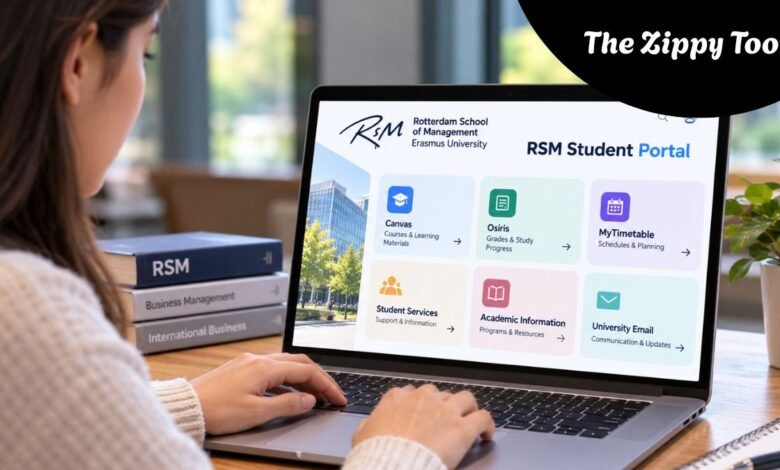
University life is easier when students can access academic information without unnecessary complications. From checking exam results to downloading lecture materials, digital learning platforms are essential to modern education. For students at Rotterdam School of Management (RSM), Erasmus University, understanding the RSM Student Portal and its connected services can make everyday academic responsibilities easier to manage.
Rotterdam School of Management is a business school in the Netherlands that offers programs in business administration, management, and related disciplines. Students use several university systems to manage their studies, communicate with instructors, review academic progress, and find key administrative information. Rather than relying on a single website for every activity, RSM students can access different services through a connected digital environment.
Whether you’re starting your first semester, preparing for exams, or managing a demanding master’s program, understanding these systems can save considerable time. Understanding where to find reliable information also helps students avoid missed deadlines, registration problems, and confusion about academic requirements.
This article explains how the RSM Student Portal works, its main features, login process, academic resources, student support services, and practical ways to resolve common access problems.
What Is the RSM Student Portal?
The RSM Student Portal is a commonly used description for the digital services available to students of Rotterdam School of Management at Erasmus University Rotterdam. The university’s primary online gateway is MyEUR, which provides access to key educational information and other university applications.
The student portal is not necessarily a single system that handles every academic task. Instead, students use MyEUR alongside specialized platforms such as Canvas, Osiris, and MyTimetable. Each serves a different purpose, making it easier to separate classroom activities from official academic administration.
MyEUR acts as an important starting point for accessing university resources. Canvas supports online learning, Osiris maintains official academic records, and MyTimetable helps students follow their course schedules. Together, these systems create a practical digital environment for managing university life.
For international students, this connected approach can be especially valuable. Moving to another country for education often involves adapting to unfamiliar administrative procedures, academic expectations, and communication methods. Learning how to navigate the university’s digital services provides a useful foundation for a smoother experience.
How to Access the RSM Student Portal
Accessing the RSM Student Portal begins with obtaining the correct Erasmus University login credentials. Students normally use their ERNA account, which is provided through the university’s registration and account-activation processes.
ERNA credentials are tied to a student’s university identity and grant access to authorized digital services. Students should carefully follow the instructions provided by Erasmus University when their account is issued.
Step-by-Step Login Process
Students can begin by visiting the official MyEUR platform through Erasmus University’s website. Once the login page appears, they should enter their assigned ERNA credentials and complete any additional identity-verification steps the university requests.
After successful authentication, students can navigate to available university services. Depending on their programme and account permissions, these may include Canvas, Osiris, timetables, university information, and other relevant academic resources.
The dashboard’s appearance and available features may change as the university updates its systems. Students should therefore rely on current institutional instructions rather than outdated screenshots or unofficial login pages.
For security, it is advisable to sign out after using university systems on shared computers. Students should also avoid saving passwords on devices others can access.
Main Features of the RSM Student Portal
The university’s connected digital platforms offer features that support academic planning, communication, and record management. Knowing which system handles each responsibility helps students find information more efficiently.
1. Access to Courses and Learning Materials
Canvas is RSM students’ main digital learning environment. It provides access to course resources, including teaching materials, lecture slides, readings, course manuals, and instructor announcements.
Students may also submit assignments through their individual Canvas course spaces when this is required by their lecturers. Tracking course announcements and submission deadlines is an important part of using the platform effectively.
The information available in Canvas depends on the courses a student is enrolled in and how instructors organize their teaching materials.
2. Academic Results and Study Progress
Tracking academic performance is an essential responsibility throughout university education. At Erasmus University Rotterdam, Osiris provides access to official student records and final course grades.
Students can use the system to review recorded results and monitor relevant enrolment information. Osiris also supports examination-related administrative processes, including registration for resit examinations where applicable.
One important distinction is that results displayed within a learning platform may not always represent the official final grade. Students should consult Osiris to confirm that their academic results have been formally registered.
3. Timetables and Academic Scheduling
Managing a busy university schedule requires dependable information about lectures, seminars, and other scheduled educational activities.
MyTimetable provides students with access to relevant course schedules. Students can add their programs or individual courses to view applicable timetable information.
This is particularly helpful for students balancing classroom attendance, group projects, independent study, and personal commitments.
Regularly checking the timetable is good practice because university schedules can change during the academic year. Students should use the latest published information when planning their activities.
4. University Communication and Announcements
Clear communication plays a major role in academic success. Students may receive important updates through Canvas announcements, official university email, and other authorized communication channels.
These messages can cover teaching arrangements, assignment requirements, administrative instructions, and changes affecting particular courses or programs.
By checking university communications consistently, students can reduce the chance of missing important instructions. Establish a routine for reviewing academic messages instead of relying on occasional portal visits.
5. Access to Student Support Information
The RSM digital environment also helps students locate information about academic procedures and university services. Rotterdam School of Management maintains student support resources covering areas such as academic calendars, program requirements, curriculum information, electives, and general student administration.
Students who need additional assistance can contact the appropriate university service or academic adviser. The correct support channel depends on the nature of the inquiry.
Why the RSM Student Portal Is Important for Students
The RSM Student Portal’s value extends beyond providing access to online documents. Its connected platforms help students organize their academic responsibilities in a structured way.
University courses frequently involve overlapping deadlines, examinations, individual assignments, group presentations, and administrative requirements. Without a consistent way to check academic information, managing these obligations can become difficult.
Using the university’s official systems allows students to distinguish between different types of information. Canvas provides learning materials and course communication, MyTimetable helps with scheduling, while Osiris maintains official academic records. This separation makes it clearer where students should look for specific information.
Digital access also offers flexibility. Students can review course resources outside normal classroom hours, as long as the relevant platform is available and they have an internet connection. This can be particularly useful during revision periods or when working remotely.
The greatest benefit, however, comes from using these tools consistently. A student who regularly checks announcements, verifies results, and reviews upcoming deadlines is generally better prepared to manage academic responsibilities.
RSM Student Portal for New and International Students
Beginning university involves much more than attending lectures. New students must understand how to access university systems, complete administrative requirements, follow program instructions, and communicate with the institution.
At Rotterdam School of Management, applicants and enrolled students may interact with different platforms depending on their stage of study.
For example, Studielink is used in the Dutch higher education registration process. Applicants to relevant RSM programs may also need to complete the institution’s Online Application Form, commonly known as OLAF.
Once students have obtained the appropriate university credentials and completed the required enrolment steps, they can begin using the digital services associated with their studies.
Do not confuse an admissions application platform with the systems used for everyday university learning. New students should follow the instructions issued for their specific program, since access requirements and onboarding procedures can differ.
RSM also provides information resources and support services to help students get familiar with university expectations during their first weeks.
Common RSM Student Portal Login Problems and Solutions
Even a well-organized university platform can occasionally present access difficulties. Login problems may arise from incorrect credentials, account activation issues, browser settings, or temporary technical disruptions.
Understanding the likely causes can help students identify the next appropriate step without compromising account security.
Incorrect Username or Password
A common issue is entering an incorrect ERNA username or password. Students should check their credentials carefully and ensure they use the correct university account rather than a personal email login.
If you’ve forgotten your password, the safest approach is to use the university’s official account recovery instructions or contact its authorized IT support service.
Problems Opening the Login Page
A login page may occasionally fail to load correctly because of browser-related problems or a temporary system issue.
Students can try refreshing the page, using a current browser, or opening a private browsing window. In some cases, existing sessions with other Microsoft accounts can interfere with the sign-in process.
If the problem continues, official Erasmus University IT support should be consulted.
Missing Course Information
Sometimes students successfully log in but cannot find a particular course or expected resource.
This does not automatically mean that their university account is faulty. Course availability can depend on enrolment status, access permissions, or whether the instructor has made the relevant materials available.
Students should first confirm their registration details and then contact the appropriate course coordinator or support service if information remains missing.
Account Security Concerns
University accounts contain personal and academic information, so take digital security seriously.
Students should avoid entering credentials on suspicious websites, sharing passwords, or responding to unexpected messages requesting sensitive account information.
Using official university pages and following current authentication requirements helps protect personal data and academic records.
Practical Tips for Using the RSM Student Portal Effectively
A productive digital study routine does not require complicated tools. It starts with knowing which university platform to use and checking information regularly.
Students can start each academic week by reviewing MyTimetable for scheduled activities and Canvas for coursework announcements or upcoming assignment deadlines. This gives them a clearer picture of their immediate responsibilities.
During the semester, they should also review their academic records in Osiris as soon as results are available. Confirming that official grades have been recorded correctly can help prevent misunderstandings about study progress.
Another useful practice is keeping important assignment dates and examination requirements in a personal planner. While the university’s systems remain the authoritative sources for their respective information, a separate planner can make it easier to see multiple commitments together.
Students should also maintain access to their university email account, since important administrative and academic communications may be delivered there.
Developing these habits can make university life more organized and reduce unnecessary last-minute difficulties.
Student Support and Academic Assistance at RSM
Online resources are valuable, but they cannot replace individual guidance when students face complicated academic or administrative situations.
Rotterdam School of Management provides access to student advisers and support services that help students understand their options and responsibilities.
Student advisers can guide students on academic matters and personal circumstances that affect their study progress. Other university services handle issues such as registration, financial administration, examinations, and graduation-related inquiries.
Students can also consult RSM’s official knowledge bases for answers to common program questions. These resources cover a range of subjects, including academic calendars, course arrangements, and administrative procedures.
When contacting a support team, explain the issue clearly and identify the relevant platform or program. Students should describe error messages accurately and avoid sharing passwords or other sensitive information unnecessarily.
Conclusion
The RSM Student Portal plays an important role in helping Rotterdam School of Management students manage the practical demands of university education. Through MyEUR and connected services such as Canvas, Osiris, and MyTimetable, students can access learning materials, review academic results, check schedules, and locate essential university information.
Understanding the difference between these platforms is the key to using them effectively. Each system serves a different purpose, and knowing where to find specific information can make academic life much easier.
For new, continuing, and international students, developing a habit of regularly checking official university systems can support better organization and more confident academic planning. With reliable access to course information and appropriate student services, students are better equipped to concentrate on their education and long-term professional development.
(FAQs)
1. What is the RSM Student Portal used for?
The RSM Student Portal refers to the university’s connected digital services that help students access course materials, academic records, schedules, announcements, and relevant university information. MyEUR is the principal gateway, while Canvas, Osiris, and MyTimetable provide specialized functions.
2. How do students log in to the RSM Student Portal?
Students generally access MyEUR and other authorized university systems using their assigned ERNA credentials. They should follow the official Erasmus University authentication process and any additional security instructions displayed during login.
3. Can students check their grades through the RSM Student Portal?
Yes. Students can review their officially recorded academic results through Osiris. Canvas may display assessment information, but Osiris is the appropriate system for checking formally registered final course grades.
4. What should students do if they cannot access their RSM account?
Students should first verify their login credentials and check that they are using the correct official platform. If the problem persists, they can follow the university’s password recovery guidance or contact Erasmus University IT support.
5. Is the RSM Student Portal available to international students?
Yes. International students enrolled in eligible Rotterdam School of Management programs can access the relevant university systems using their authorized accounts. The specific services available depend on their program, enrolment status, and access permissions.